Free Tool · Download YouTube Thumbnails

YouTube Thumbnail Downloader

Download HD, 4K thumbnails from any YouTube video. Free, fast, no signup required.

Result guide

Choose the best thumbnail YouTube actually provides

After you paste a video URL, the downloader checks the real thumbnail files YouTube exposes for that video. If 1280x720 is missing, it usually means YouTube did not publish that image for the video, not that the download failed.

How to read the thumbnail result

Best first

Start with Max Resolution

Use 1280x720 when it appears. If it is missing, Standard or High Quality is the best available file for that video.

Not guaranteed

HD can be unavailable

Older uploads, Shorts, live streams, and some processed videos may expose fewer thumbnail sizes.

Format choice

JPG for compatibility, WebP for size

JPG works almost everywhere. WebP is usually smaller and useful when page speed or storage matters.

A clearer download flow

Paste the YouTube link, compare the available sizes, then download the version that fits your use case. This avoids guessing from a generic thumbnail size chart.

Why the HD option may disappear

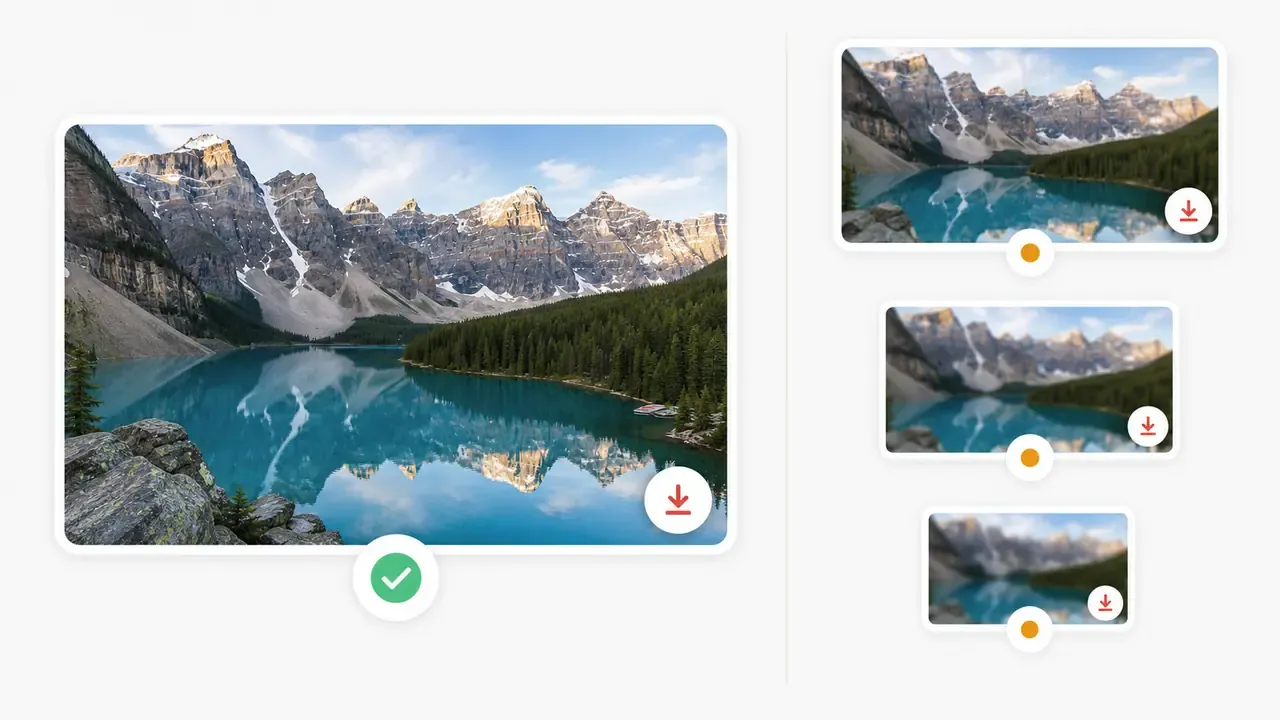
A thumbnail downloader cannot invent a file that YouTube does not expose. When maxresdefault is unavailable, choose the next largest visible option and avoid stretching a small thumbnail into a large design.
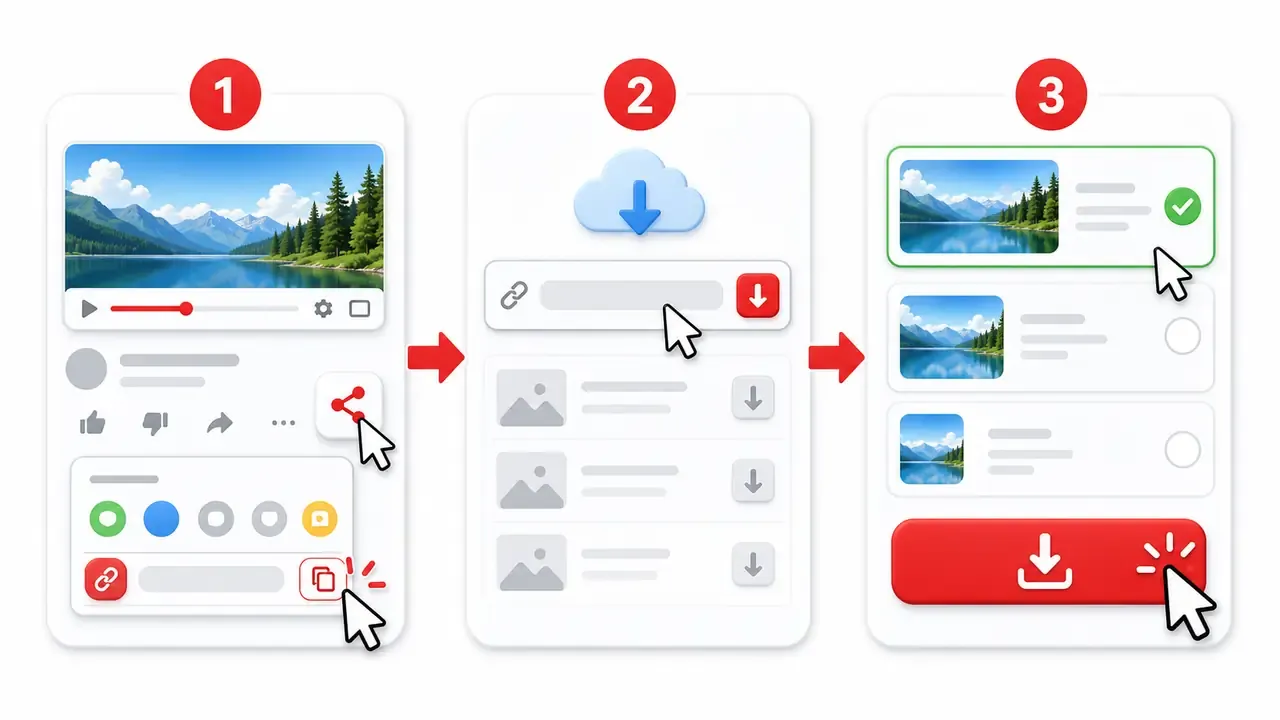
YouTube thumbnail downloader workflow showing paste, compare, and download steps
Comparison of available YouTube thumbnail quality options and missing HD fallback

Extra thumbnail questions

Why is 1280x720 or maxresdefault not showing?
That size only appears when YouTube has a real max resolution thumbnail for the video. If it is missing, use the largest available fallback instead of upscaling a smaller image.
Can I save a YouTube Shorts thumbnail on my phone?
Yes. Paste the Shorts URL, open the available image size, then use your phone browser save option. Some Shorts may not expose every wide thumbnail size.
Should I download JPG or WebP?
Choose JPG when you need broad compatibility with editors, presentations, or social apps. Choose WebP when you want a smaller file for websites or fast sharing.
What should I do if only small thumbnails appear?
Download the largest visible size and keep it close to its original dimensions. Small thumbnails can look blurry if stretched into a large blog image or presentation slide.

How to Download YouTube Thumbnails

Three simple steps to get any YouTube video thumbnail

1

Copy Video URL

Copy the YouTube video link from your browser or the YouTube app

2

Paste & Click

Paste the URL above and click "Get Thumbnails" to see all available sizes

3

Download

Click the download button or right-click to save the thumbnail you want

Why Choose Our YouTube Thumbnail Grabber

Trusted by thousands of creators and designers worldwide

100% Free

No fees, no subscriptions, no hidden costs. Download unlimited thumbnails.

Fast & Easy

Paste URL, click download. Get thumbnails in seconds.

HD Quality

Download in max resolution 1280×720. No watermarks.

All Devices

Works on PC, Mac, Android, iPhone, iPad. Any browser.

No Signup

No registration, no login, no app installation required.

Safe & Secure

We don't store your data. 100% secure and private.

Multi-Format

Download in JPG or WebP format. Your choice.

Global Access

Works worldwide on Chrome, Firefox, Safari, Edge.

Supported YouTube Content Types

Download thumbnails from any type of YouTube content

Regular Videos

Standard YouTube videos

YouTube Shorts

Vertical short-form videos

Live Streams

YouTube Live & past broadcasts

Playlists

Any video from playlists

Premieres

Scheduled premiere videos

Embedded Videos

Paste embed URLs too

YouTube Thumbnail Sizes

All available thumbnail resolutions for YouTube videos

QualityResolutionBest For
Max Resolution HD1280×720Blog posts, presentations, high-quality usage
Standard Definition SD640×480Social media posts, medium-sized displays
High Quality480×360Thumbnails, previews, website embeds
Medium Quality320×180Small previews, fast loading
Default120×90Tiny icons, list views

Note: Max Resolution (1280×720) may not be available for older or low-quality videos.

Understand missing HD thumbnails

This guide explains why max resolution is not always available and how to interpret missing sizes across regular videos, Shorts, live streams, and older uploads.

Frequently Asked Questions

Common questions about downloading YouTube thumbnails

Is it free to download YouTube thumbnails?
Yes, this tool is completely free to use. No signup, no payment, no limits. Download as many thumbnails as you need.
Can I use downloaded thumbnails commercially?
YouTube thumbnails are copyrighted by their creators. You can use them for personal reference, criticism, commentary, or education (fair use). For commercial use, you should get permission from the video owner.
Why is the HD thumbnail not available for some videos?
The max resolution (1280×720) thumbnail is only available for videos uploaded in HD quality (720p or higher). Older videos or those uploaded in lower quality may only have smaller thumbnail sizes available.
What YouTube URL formats are supported?
We support all common YouTube URL formats including:
  • youtube.com/watch?v=VIDEO_ID
  • youtu.be/VIDEO_ID
  • youtube.com/embed/VIDEO_ID
  • youtube.com/shorts/VIDEO_ID
  • Just the video ID (11 characters)
What is the ideal YouTube thumbnail size and resolution?
The ideal YouTube thumbnail size is 1280×720 pixels with a 16:9 aspect ratio. This resolution ensures your thumbnail looks crisp on all devices. YouTube recommends thumbnails be at least 640 pixels wide. Our tool lets you download thumbnails at the maximum available resolution.
Can I download YouTube Shorts thumbnails?
Yes! Our YouTube Shorts thumbnail downloader fully supports Shorts videos. Simply paste the Shorts URL (youtube.com/shorts/VIDEO_ID) and we'll fetch all available thumbnail sizes for you to download.
Can I download YouTube Live stream thumbnails?
Absolutely! Our YouTube live thumbnail downloader works with both active live streams and past broadcast recordings. Just paste the live stream URL and download the thumbnail in any available resolution.
What image formats can I download thumbnails in?
You can download thumbnails in JPG or WebP format. JPG offers broader compatibility, while WebP provides smaller file sizes. Use the format toggle buttons to switch between formats before downloading.
Do I need to install a browser extension or app?
No installation required! Unlike YouTube thumbnail downloader Chrome extensions, our tool works directly in your browser. No apps, no extensions, no software to install. Just paste the URL and download.
Is downloading YouTube thumbnails legal?
Yes, it is legal and safe to download YouTube thumbnails for personal, educational, or research purposes (fair use). However, thumbnails are copyrighted by their creators, so always respect ownership and avoid commercial reuse without permission.

Legal Disclaimer

This YouTube Thumbnail Downloader is an independent tool and is not affiliated with YouTube or Google LLC.

All thumbnails remain the copyright of their original creators. This tool only accesses publicly available thumbnail images and does not host, store, or modify any YouTube content.

Please use downloaded thumbnails responsibly and respect intellectual property rights.

Need More YouTube Tools?

Check out our playlist length calculator and other free tools.

Browse All Tools