
YouTube thumbnail size: 1280x720 और 16:9 ratio
अगर आप खुद YouTube thumbnail बना रहे हैं, तो सबसे safe target आम तौर पर 16:9 ratio में 1280x720 होता है.
लेकिन किसी existing video से thumbnail लेने पर कई versions मिल सकते हैं, और choice आपके layout पर depend करती है.
कब काम आता है
Creators, teachers, bloggers, editors और documentation writers अक्सर YouTube image को YouTube के बाहर use करते समय यह search करते हैं.
Size समझने से layout टूटने, blurry image और गलत crop से बचा जा सकता है.
सुझाया गया तरीका
- Decide करें कि आपको large image चाहिए या small preview.
- अगर available हो तो 1280x720 version check करें.
- अगर largest image missing है, तो smaller versions compare करें.
- Final layout में ratio और mobile display जरूर देखें.
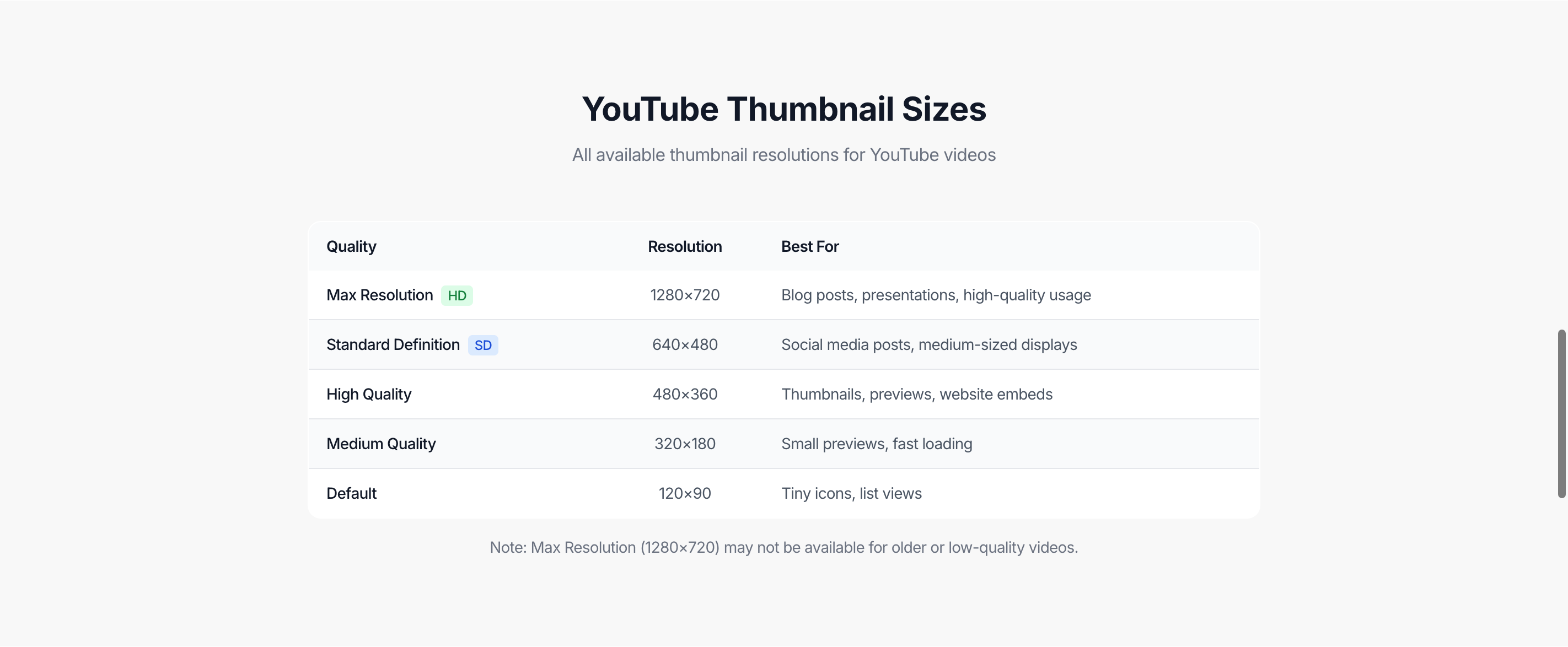
1280x720, 640x480, 480x360
| File | Dimensions | किस काम के लिए |
|---|---|---|
maxresdefault | 1280x720 | Blog, presentation और बड़े preview |
sddefault | 640x480 | मध्यम preview और supporting material |
hqdefault | 480x360 | छोटे cards, notes और quick lists |
आम गलतियां
- Video में available न होने पर भी 1280x720 force करना.
- 4:3 image को 16:9 container में stretch करना.
- Mobile preview check न करना.
अक्सर पूछे जाने वाले सवाल
Recommended YouTube thumbnail size क्या है?
Custom thumbnail बनाते समय 1280x720 और 16:9 ratio सबसे safe baseline है.
480x360 thumbnail क्यों मिलता है?
YouTube अलग-अलग preview contexts के लिए कई public image versions देता है.
क्या हमेशा सबसे बड़ी image use करनी चाहिए?
नहीं. Small card या list में smaller image fast load हो सकती है और फिर भी साफ दिख सकती है.
क्या Shorts thumbnail भी यही होता है?
Shorts का display अलग हो सकता है, इसलिए final layout में actual preview check करें.
Tool इस्तेमाल करें
YouTube Thumbnail Downloader खोलें, video paste करें और use करने से पहले dimensions compare करें.
संबंधित गाइड
ये गाइड उसी YouTube workflow में अगला सवाल हल करने में मदद करती हैं.
YouTube thumbnail HD या maxresdefault क्यों नहीं दिखता
समझें कि किसी YouTube video में HD thumbnail, 1280x720 या maxresdefault क्यों missing हो सकता है, और available best quality कैसे चुनें.
YouTube video को किसी specific time से share कैसे करें
Normal video, youtu.be link, Shorts या playlist के अंदर video के लिए minute और second से शुरू होने वाला YouTube timestamp link बनाएं.